All Hacking Tools And Hacking Tutorials Are Only For Education Purposes,..
Showing posts with label Tips And Tricks. Show all posts

How To Invite All Friends To Like Page Just In One Click (Easy Way) - FOCSoft


Just a few days ago, I sent over 2,500 invitations to my facebook friends, asking them to like my fan page. You think I selected them one by one? Come on, you know that’s definitely not possible, I used a simple javascript that saved me the trouble of selecting them one after the other. With this script, I was able to select all friends and send the fan page invitation. Selecting your friends can be quite stressful especially if the page is new and you have tons of invites to send.
So, how Did I go about it?
Like I told you before, it’s nothing but a simple piece of java-script but we’re going to make a bookmark let with it

First download Java script from here Click here.
Now open your chrome browser and right click on Bookmark tab and click Add Page

How To Invite All Friends To Like Page Just In One Click (Easy Way) - FOCSoft
-Than open the New bookmark option and Insert link in tab and save

- After that, go to your fan page and click on Build Audience > Invite Friends
- When your friends list come up, simply click on the bookmarklet you created toolbar earlier.

How To Invite All Friends To Like Page Just In One Click (Easy Way) - FOCSoft
- It automatically selects all your friends and you can now send the invitation!
Hey, you may have to repeat this process a number of times depending on the number of people you have on your list. I tried it on a fan page but a friend also said it worked for event invitation. In case you have a facebook group too, you can try it and let us know if it works.

How To Add All Friends In Group (Super Fast Way) 2014 - FOCSoft

Hello Friends,.. Assalam O Alikum

Today I'm Sharing A Facebook Script ( Auto Friends Adder In Group )

For This Purpose We Need Firefox
First Of All Open Facebook Group > Then Press Ctrl+Shift+k .
Then Paste This Script In Console .....


 // ==UserScript==
// @name Add All Friends To Group By SHAHBAZ
// @namespace Hacking Tools And Hacking Tutorials
// @author Muhammad Shahbaz
// @include *://*.facebook.com/PrinceOfSahuka*
// @grant none
// @description Add All Your Friends To Facebook Group With Single Click
// @version 1
// ==/UserScript==
var T = 0;
var scss = 0;
var fail = 0;
var Allids = [];
var freeform = [];
var userStop = false;
var fb_dtsg = "";
var user = "672632971";"672632971"
var GroupId = "270219893156884";
var lang = document.documentElement.lang;
if (["ar"].indexOf(lang) < 0) {
lang = "en";
} else {
lang = "ar";
}
var locales = {
"ar": {
"addbstr": "????? ?? ????????",
"dlgtstr": "????? ???????? ??????",
"dlgwstr": "?? ???? ????? ?????? ...",
"dlgastr": "???? ?? ???? ??? ????? ??? ??? ??? ????????",
"dlgfstr": "??? ????????",
"dlgpstr": "??????",
"dlgrstr": "????",
"dlgsstr": "????",
"dlgistr": "???",
"dlgostr": "?????",
"dlgfsstr": "??? ?? ??????? (?????? ??????? ?? ????? ?? ????????)",
"dlgffstr": "?? ??????? ?????",
"dlgcnstr": "?????",
"dlgclstr": "?????"
},
"en": {
"addbstr": "Add All Friends",
"dlgtstr": "Adding Friends to Group",
"dlgwstr": "Www.FOCSoft.Blogspot.Com",
"dlgastr": "This May Take Some Time Depending On Your Friends Number",
"dlgfstr": "Approximately Friends Numbers",
"dlgpstr": "Processed",
"dlgrstr": "Remaining",
"dlgsstr": "Successed",
"dlgistr": "Failed",
"dlgostr": "Finish",
"dlgfsstr": "Faild to Add (Can't Add or Already a member)",
"dlgffstr": "Added successfully",
"dlgcnstr": "Cancel",
"dlgclstr": "Close"
}
};
var addbstr = locales[lang].addbstr;
var dlgtstr = locales[lang].dlgtstr;
var dlgwstr = locales[lang].dlgwstr;
var dlgastr = locales[lang].dlgastr;
var dlgfstr = locales[lang].dlgfstr;
var dlgpstr = locales[lang].dlgpstr;
var dlgrstr = locales[lang].dlgrstr;
var dlgsstr = locales[lang].dlgsstr;
var dlgistr = locales[lang].dlgistr;
var dlgfsstr = locales[lang].dlgfsstr;
var dlgffstr = locales[lang].dlgffstr;
var dlgcnstr = locales[lang].dlgcnstr;
var dlgclstr = locales[lang].dlgclstr;
var dlgostr = locales[lang].dlgostr;
CheckUrl(location.href);
var oldLocation = location.href;
setInterval(function() {
if(location.href != oldLocation) {
oldLocation = location.href;
CheckUrl(location.href);
}
}, 500);
function CheckUrl(place) {
if (/\/groups([\/?]|$)/i.test(place)) {
Main();
}
}
function Main() {
setTimeout(function(){ Main(); }, 500);
var settingsbutton = document.querySelector("#group_edit_settings_button");
var settingsbuttoncheck = setInterval(function() {
if (!document.getElementById('fbga') && settingsbutton) {
clearInterval(settingsbuttoncheck);
var groupsActions = settingsbutton.parentElement.parentElement;
var addbutton = document.createElement("a");
addbutton.className = "uiSelectorButton uiButton";
addbutton.id = "fbga";
var addbuttoninht = "addbuttoninht += "ass='uiButtonText'>" + addbstr + "";
addbutton.innerHTML = addbuttoninht;
addbutton.href = "#";
addbutton.addEventListener('click', GetFriends, false)
var addbuttonli = document.createElement("li");
addbuttonli.appendChild(addbutton);
groupsActions.insertBefore(addbuttonli, groupsActions.firstChild);
}
}, 10);
}
function GetFriends() {
if (!document.getElementById('fbgadialog')) {
userStop = false;
fb_dtsg = document.getElementsByName('fb_dtsg')[0].value;
user = getCookie("c_user");
GroupId = document.getElementsByName('group_id')[0].value;
var now = "&uid=" + (new Date).getTime();
var params = '__a=1&viewer=' + user + '&filter[0]=user&__user=' ;
params += user + now;
with (new XMLHttpRequest) {
open('GET', '/ajax/typeahead/first_degree.php?' + params, true);
send();
var result = "";
onreadystatechange = function (){
if (this.readyState == 4) {
if (this.status == 200) {
if (this.responseText) {
result = this.responseText;
result = result.substr(result.indexOf("[{")+2);
result = result.replace(/},{/gi, "\r\n");
GetIds(result);
}
}
}
}
}
}
}
function GetIds(res){
Allids = [];
freeform = [];
T = 0;
scss = 0;
fail = 0;
rre = res.split("\r\n");
for (var i = 0; i < rre.length; i++) {
var lin = rre[i].split(",");
var id = lin[0].split(":").pop();
var nam = lin[3].split(":").pop();
nam = nam.replace(/\"/gi,"");
freeform.push(nam)
Allids.push(id);
}
AddToGroup();
}
function AddToGroup() {
var AddDiv = document.createElement("div");
AddDiv.className = "_10 uiLayer";
AddDiv.id = "fbgadialog";
AddDiv.setAttribute("role", "dialog");
var bodytxt = "
";
AddDiv.innerHTML = bodytxt;
document.body.appendChild(AddDiv);
var dlgclose = document.createElement("a");
dlgclose.className = "_42ft _42fu layerCancel uiOverlayButton _42gy";
dlgclose.setAttribute("role", "button");
dlgclose.href = "#";
dlgclose.id = "fbgabut";
dlgclose.textContent = dlgcnstr;
dlgclose.addEventListener('click', CancelButton , false);
document.getElementById("fbgadivclose").appendChild(dlgclose);
setTimeout(doinggo , 100);
}
function CancelButton() {
userStop = true;
}
function doinggo() {
if (T < Allids.length && !userStop) {
var params = "fb_dtsg=" + fb_dtsg + "&group_id=" + GroupId ;
params += "&source=typeahead&ref=&message_id=u_0_0&members=" ;
params += Allids[T] + "&freeform=" + encodeURIComponent(freeform[T]);
params += "&__user=" + user + "&__a=1&__req=f";
params += "&phstamp=" + generatePhstamp(params, fb_dtsg);
with (new XMLHttpRequest) {
open('POST', '/ajax/groups/members/add_post.php', true);
send(params);
var msg = "";
console.log("onreadystatechange");
onreadystatechange = function() {
if (this.readyState == 4) {
if (this.status == 200) {
if (this.responseText) {
console.log("responseText");
msg = this.responseText;
if (msg.indexOf("errorSummary") !== -1) {
fail++
document.getElementById("fbgapro").textContent = T + 1;
document.getElementById("fbgaram").textContent = (Allids.length - T - 1);
document.getElementById("fbgafal").textContent = fail;
T++
setTimeout(doinggo, 10);
} else {
scss++
document.getElementById("fbgapro").textContent = T + 1;
document.getElementById("fbgaram").textContent = (Allids.length - T - 1);
document.getElementById("fbgasuc").textContent = scss;
T++
setTimeout(doinggo, 10);
}
}
}
}
}
}
} else {
document.getElementById("fbgadlglin1").textContent = dlgostr;
document.getElementById("fbgadlglin2").innerHTML = "" + scss + " " + dlgffstr;
document.getElementById("fbgadlglin3").setAttribute("style", "font-weight:bold;");
document.getElementById("fbgadlglin3").innerHTML = "" + fail + " " + dlgfsstr;
document.getElementById("fbgadlglin4").parentNode.removeChild(document.getElementById("fbgadlglin4"));
document.getElementById("fbgabut").parentNode.removeChild(document.getElementById("fbgabut"));
var dlgclos = document.createElement("a");
dlgclos.className = "_42ft _42fu layerCancel uiOverlayButton _42gy";
dlgclos.setAttribute("role", "button");
dlgclos.href = "#";
dlgclos.id = "fbgabut";
dlgclos.textContent = dlgclstr;
dlgclos.addEventListener('click', CloseButton , false);
document.getElementById("fbgadivclose").appendChild(dlgclos);
}
}
function CloseButton() {
document.getElementById("fbgadialog").parentNode.removeChild(document.getElementById("fbgadialog"));
}
function generatePhstamp(qs, dtsg) {
var input_len = qs.length;
numeric_csrf_value='';
for(var ii=0;iinumeric_csrf_value+=dtsg.charCodeAt(ii);
}
return '1' + numeric_csrf_value + input_len;
}
function getCookie(c_name) {
var i,x,y,ARRcookies=document.cookie.split(";");
for (i=0;ix=ARRcookies[i].substr(0,ARRcookies[i].indexOf("="));
y=ARRcookies[i].substr(ARRcookies[i].indexOf("=")+1);
x=x.replace(/^\s+|\s+$/g,"");
if (x==c_name) {
return unescape(y);
}
}
}


When You Done It, At The Header Show Like This

How To Add All Friends In Group (Super Fast Way) 2014 - FOCSoft
Click ( Add All Friends ) Now It'll Look Like This,..

How To Add All Friends In Group (Super Fast Way) 2014 - FOCSoft
Now Wait Till Its End ....................
This Post Is Requested By ( 0ne Of My Best Friend ) Syed Jeeshan Ali.....

How To Block Any Website Without Software 2014 - FOCSoft


 Today in internet many fraud scam and harmful website available for stole your importent informations but today i am show you how to block that website without any software or any tool.so lets start our trick below


 How To Block Any Website Without Software 2014 - FOCSoft


Steps:

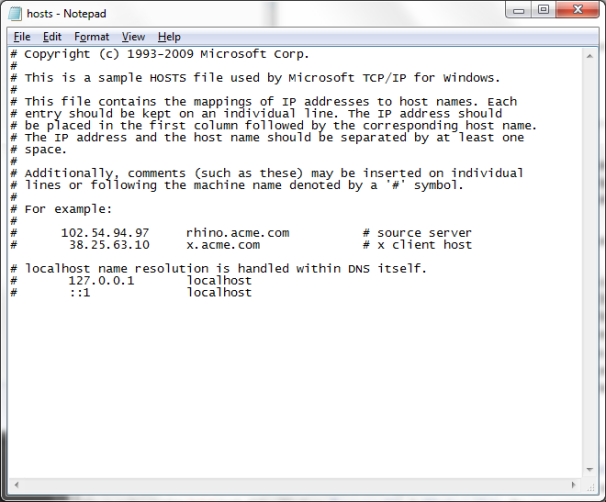
1] Browse C:\WINDOWS\system32\drivers\etc

2] Find the file named "HOSTS"

3] Open it in notepad


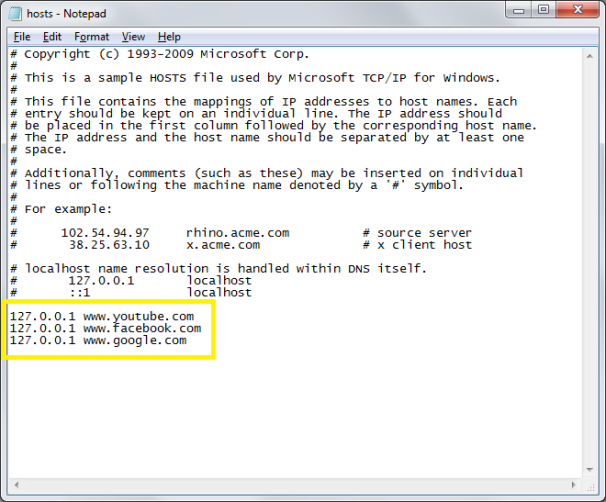
4] Under "127.0.0.1 localhost" Add 127.0.0.2 www.sitenameyouwantblocked.com , and that site will no longer be accessable.


5] Done!

-So-

127.0.0.1 localhost
127.0.0.2 www.blockedsite.com

-->www.blockedsite.com is now unaccessable<-- span="">


For every site after that you want to add, just add "1" to the last number in the internal ip (127.0.0.2) and then the addy like before.

IE: 127.0.0.3 www.blablabla.com
127.0.0.4 www.blablabla.com
127.0.0.5 www.blablabla.com 

How To Access Blocked Website By Department Of Telecom - FOCSoft

From a few months many website blocked by government and user facing problem to access them,
Same here me also facing this problem too but here is one solution

This site has been blocked as per instructions from Department of Telecom (DOT) .

 How To Access Blocked Website By Department Of Telecom - FOCSoft
So here we are share one easy trick to access blocked website by Department of telecom

Just Put https:// before website blocked

Example :- xyz.com (Wrong)
                   https://www.xyz.com (Correct)


Now you can access blocked website


Enjoy! :)

How To Chack Any Wbesite Vulnerability - FOCSoft


Top 3 Vulnerability Scanners Tool

  • Hello Friends
Web site security is extremely necessary as a result of web site contain relevant info a few company and currently a days website defacement is extremely common even a script kiddies and a brand new born hackers will try this. the foremost common vulnerability like SQL-Injection and cross website scripting lead towards the defacement.

Vulnerability-scanning

So you wish to secure your net application than realize vulnerabilities thereon before a hacker realize it, try and use some relevant tools and realize vulnerabilities and fix it. There area unit such a big amount of tools offered for each Windows and Linux platform and business and open source tool. Below is that the best internet vulnerability scanner tool that we've mentioned before.


Free, Open Source, Simple, Distributed, Intelligent, Powerful, Friendly. Arachni is an Open Source, feature-full, modular, high-performance Ruby framework aimed towards helping penetration testers and administrators evaluate the security of web applications. 

It is smart, it trains itself by learning from the HTTP responses it receives during the audit process and is able to perform meta-analysis using a number of factors in order to correctly assess the trustworthiness of results and intelligently identify false-positives. 
arachni-scanner

It is versatile enough to cover a great deal of use cases, ranging from a simple command line scanner utility, to a global high performance grid of scanners, to a Ruby library allowing for scripted audits, to a multi-user multi-scan web collaboration platform.


Acunetix has pioneered the web application security scanning technology: Its engineers have focused on web security as early as 1997 and developed an engineering lead in web site analysis and vulnerability detection
acunetix-scanner

As many as 70% of websites have vulnerabilities which could be exploited by 
hackers or rogue insiders, leading to theft of sensitive corporate data such as 
credit card information and customer lists.

Hackers concentrate their efforts on web-based applications such as 
shopping carts, forms, login pages, dynamic content and plain-and-simple 
human error. Accessible 24/7 from anywhere in the world, insecure web 
applications provide easy access to backed corporate databases and allow 
hackers to perform illegal activities using the compromised site.


Netsparker is the only False-positive-free web application security scanner. Simply point it at your website and it will automatically discover the flaws that could leave you dangerously exposed.

nesparker-scanner

How To Bypass Windows XP Login Passwords From Scratch - FOCSoft

Hello Friends
 
 
Step 1: The golden disclaimer
First, the standard disclaimer that goes with any good Instructable: This is to be used for instructional purposes only, and I am not liable for any damage or destruction to you or your computer that may occur from attempting this Instructable. In other words, if you delete your registry or mess with a school computer and get arrested, it's not my fault. And don't use this to get into someone else's computer either.*cough*
Step 2: The easy part
How To Bypass Windows XP Login Passwords From Scratch - FOCSoft
Ok, now to start.
If you have a login page like the one in the intro, go to step 2. If you have a login page like this one, it should be relatively easy to get into. Unless the default administrator account has been changed, all you have to do is type "Administrator" or "administrator" as the user name and the password will be either blank or "password". Then press "OK" and you should be in.
Step 3: The nastier part

How To Bypass Windows XP Login Passwords From Scratch - FOCSoft
If you have a fancy windows login page, things are a little more annoying. First, click "shut down" to shut down the computer. Then turn it back on. As soon as the screen turns on, press and hold F8. After about 10 seconds, a boot options menu will pop up.
Step 4: Safe mode
How To Bypass Windows XP Login Passwords From Scratch - FOCSoft
Now, in the menu, which should look like the picture below, select safe mode and press enter. It will show a whole bunch of gobbleygook for quite a while, (which you don't need to know anything about)and then it will bring you to the login page. This time though, there should be an account named "administrator". Click it, and either type "password" or nothing, whichever one works. If you don't get in after that, you're bummed

How To Lock Files With Out Software - FOCSoft


Hello Friends
How many times have you wished of a software using which you can hide or lock files, restricting its access to other unwanted users. Although there are various software available in market using which you can easily lock/hide files but, i personally dont trust them because most of them are bloatware or spyware.
In this post i am going to share a simple yet powerful way of locking and hiding important files using a the following method. Follow the instructions to make you own Locker ( Without any software !! ) :

Open notepad.
Copy the following code in notepad file :


cls @ECHO OFF title Folder Locker if EXIST "Control Panel.{21EC2020-3AEA-1069-A2DD-08002B30309D}" goto UNLOCK if NOT EXIST Locker goto MDLOCKER :CONFIRM echo Are you sure u want to Lock the folder(Y/N) set/p "cho=>" if %cho%==Y goto LOCK if %cho%==y goto LOCK if %cho%==n goto END if %cho%==N goto END echo Invalid choice. goto CONFIRM :LOCK ren Locker "Control Panel.{21EC2020-3AEA-1069-A2DD-08002B30309D}" attrib +h +s "Control Panel.{21EC2020-3AEA-1069-A2DD-08002B30309D}" echo Folder locked goto End :UNLOCK echo Enter password to Unlock folder set/p "pass=>" if NOT %pass%==YOUR PASSWORD HERE goto FAIL attrib -h -s "Control Panel.{21EC2020-3AEA-1069-A2DD-08002B30309D}" ren "Control Panel.{21EC2020-3AEA-1069-A2DD-08002B30309D}" Locker echo Folder Unlocked successfully goto End :FAIL echo Invalid password goto end :MDLOCKER md Locker echo Locker created successfully goto End :End


Change the “YOUR PASSWORD HERE” with your password.
Save it as batch file ( with extension .bat ) For eg. Locker.bat
Now you will see a batch file. Double click it to create a folder locker ( A new folder named Locker would be formed at the same location )
Thats it you have now created your own locker and that too without using any software !
Brings all the files you want to hide in the locker folder.
Double click the batch ( As created above ) file to lock the folder namely Locker.
If you want to unlock your files, simple double click the batch file again and you would be prompted for password ( In DOS window ). Enter the password and enjoy access to the folder.
But don’t delete .bat file and loose your stuff……. -

History Of Virus - FOCSoft

Hello Friends
Like any other field in computer science, viruses have evolved -a great deal indeed- over the years. In the series of press releases which start today, we will look at the origins and evolution of malicious code since it first appeared up to the present.

Going back to the origin of viruses, it was in 1949 that Mathematician John Von Neumann described self-replicating programs which could resemble computer viruses as they are known today. However, it was not until the 60s that we find the predecessor of current viruses. In that decade, a group of programmers developed a game called Core Wars, which could reproduce every time it was run, and even saturate the memory of other players’ computers. The creators of this peculiar game also created the first antivirus, an application named Reeper, which could destroy copies created by Core Wars.

However, it was only in 1983 that one of these programmers announced the existence of Core Wars, which was described the following year in a prestigious scientific magazine: this was actually the starting point of what we call computer viruses today.


At that time, a still young MS-DOS was starting to become the preeminent operating system worldwide. This was a system with great prospects, but still many deficiencies as well, which arose from software developments and the lack of many hardware elements known today. Even like this, this new operating system became the target of a virus in 1986: Brain, a malicious code created in Pakistan which infected boot sectors of disks so that their contents could not be accessed. That year also saw the birth of the first Trojan: an application called PC-Write.

Shortly after, virus writers realized that infecting files could be even more harmful to systems. In 1987, a virus called Suriv-02 appeared, which infected COM files and opened the door to the infamous viruses Jerusalem or Viernes 13. However, the worst was still to come: 1988 set the date when the “Morris worm” appeared, infecting 6,000 computers.

From that date up to 1995 the types of malicious codes that are known today started being developed: the first macro viruses appeared, polymorphic viruses … Some of these even triggered epidemics, such as MichaelAngelo. However, there was an event that changed the virus scenario worldwide: the massive use of the Internet and e-mail. Little by little, viruses started adapting to this new situation until the appearance, in 1999, of Melissa, the first malicious code to cause a worldwide epidemic, opening a new era for computer viruses.


part 2


This second installment of ‘The evolution of viruses’ will look at how malicious code used to spread before use of the Internet and e-mail became as commonplace as it is today, and the main objectives of the creators of those earlier viruses.
Until the worldwide web and e-mail were adopted as a standard means of communication the world over, the main mediums through which viruses spread were floppy disks, removable drives, CDs, etc., containing files that were already infected or with the virus code in an executable boot sector.

When a virus entered a system it could go memory resident, infecting other files as they were opened, or it could start to reproduce immediately, also infecting other files on the system. The virus code could also be triggered by a certain event, for example when the system clock reached a certain date or time.  In this case, the virus creator would calculate the time necessary for the virus to spread and then set a date –often with some particular significance- for the virus to activate. In this way, the virus would have an incubation period during which it didn’t visibly affect computers, but just spread from one system to another waiting for ‘D-day’ to launch its payload. This incubation period would be vital to the virus successfully infecting as many computers as possible.

One classic example of a destructive virus that lay low before releasing its payload was CIH, also known as Chernobyl. The most damaging version of this malicious code activated on April 26, when it would try to overwrite the flash-BIOS, the memory which includes the code needed to control PC devices. This virus, which first appeared in June 1998, had a serious impact for over two years and still continues to infect computers today.

Because of the way in which they propagate, these viruses spread very slowly, especially in comparison to the speed of today’s malicious code. Towards the end of the Eighties, for example, the Friday 13th (or Jerusalem) virus needed a long time to actually spread and continued to infect computers for some years. In contrast, experts reckon that in January 2003, SQLSlammer took just ten minutes to cause global communication problems across the Internet.

Notoriety versus stealth

For the most part, in the past, the activation of a malicious code triggered a series of on screen messages or images, or caused sounds to be emitted to catch the user’s attention.  Such was the case with the Ping Pong virus, which displayed a ball bouncing from one side of the screen to another. This kind of elaborate display was used by the creator of the virus to gain as much notoriety as possible. Nowadays however, the opposite is the norm, with virus authors trying to make malicious code as discreet as possible, infecting users’ systems without them noticing that anything is amiss.


pat 3


This third installment of ‘The evolution of viruses’ will look at how the Internet and e-mail changed the propagation techniques used by computer viruses.

Internet and e-mail revolutionized communications. However, as expected, virus creators didn’t take long to realize that along with this new means of communication, an excellent way of spreading their creations far and wide had also dawned. Therefore, they quickly changed their aim from infecting a few computers while drawing as much attention to themselves as possible, to damaging as many computers as possible, as quickly as possible. This change in strategy resulted in the first global virus epidemic, which was caused by the Melissa worm.

With the appearance of Melissa, the economic impact of a virus started to become an issue. As a result, users -above all companies- started to become seriously concerned about the consequences of viruses on the security of their computers. This is how users discovered antivirus programs, which started to be installed widely. However, this also brought about a new challenge for virus writers, how to slip past this protection and how to persuade users to run infected files.

The answer to which of these virus strategies was the most effective came in the form of a new worm: Love Letter, which used a simple but effective ruse that could be considered an early type of social engineering. This strategy involves inserting false messages that trick users into thinking that the message includes anything, except a virus. This worm’s bait was simple; it led users to believe that they had received a love letter.

This technique is still the most widely used. However, it is closely followed by another tactic that has been the center of attention lately: exploiting vulnerabilities in commonly used software. This strategy offers a range of possibilities depending on the security hole exploited. The first malicious code to use this method –and quite successfully- were the BubbleBoy and Kakworm worms. These worms exploited a vulnerability in Internet Explorer by inserting HTML code in the body of the e-mail message, which allowed them to run automatically, without needing the user to do a thing.

Vulnerabilities allow many different types of actions to be carried out. For example, they allow viruses to be dropped on computers directly from the Internet -such as the Blaster worm-. In fact, the effects of the virus depend on the vulnerability that the virus author tries to exploit.


part 4


In the early days of computers, there were relatively few PCs likely to contain “sensitive” information, such as credit card numbers or other financial data, and these were generally limited to large companies that had already incorporated computers into working processes.

In any event, information stored in computers was not likely to be compromised, unless the computer was connected to a network through which the information could be transmitted. Of course, there were exceptions to this and there were cases in which hackers perpetrated frauds using data stored in IT systems. However, this was achieved through typical hacking activities, with no viruses involved.

The advent of the Internet however caused virus creators to change their objectives, and, from that moment on, they tried to infect as many computers as possible in the shortest time. Also, the introduction of Internet services -like e-banking or online shopping- brought in another change. Some virus creators started writing malicious codes not to infect computers, but, to steal confidential data associated to those services.  Evidently, to achieve this, they needed viruses that could infect many computers silently.

Their malicious labor was finally rewarded with the appearance, in 1986, of a new breed of malicious code generically called “Trojan Horse”, or simply “Trojan”. This first Trojan was called PC-Write and tried to pass itself off as the shareware version of a text processor. When run, the Trojan displayed a functional text processor on screen. The problem was that, while the user wrote, PC-Write deleted and corrupted files on the computers’ hard disk.

After PC-Write, this type of malicious code evolved very quickly to reach the stage of present-day Trojans. Today, many of the people who design Trojans to steal data cannot be considered virus writers but simply thieves who, instead of using blowtorches or dynamite have turned to viruses to commit their crimes. Ldpinch.W or the Bancos or Tolger families of Trojans are examples of this


part 5


Even though none of them can be left aside, some particular fields of computer science have played a more determinant role than others with regard to the evolution of viruses. One of the most influential fields has been the development of programming languages.

These languages are basically a means of communication with computers in order to tell them what to do. Even though each of them has its own specific development and formulation rules, computers in fact understand only one language called "machine code".

Programming languages act as an interpreter between the programmer and the computer. Obviously, the more directly you can communicate with the computer, the better it will understand you, and more complex actions you can ask it to perform.

According to this, programming languages can be divided into "low and high level" languages, depending on whether their syntax is more understandable for programmers or for computers. A "high level" language uses expressions that are easily understandable for most programmers, but not so much for computers. Visual Basic and C are good examples of this type of language.

On the contrary, expressions used by "low level" languages are closer to machine code, but are very difficult to understand for someone who has not been involved in the programming process. One of the most powerful, most widely used examples of this type of language is "assembler".

In order to explain the use of programming languages through virus history, it is necessary to refer to hardware evolution. It is not difficult to understand that an old 8-bit processor does not have the power of modern 64-bit processors, and this of course, has had an impact on the programming languages used.

In this and the next installments of this series, we will look at the different programming languages used by virus creators through computer history:

- Virus antecessors: Core Wars

As was already explained in the first chapter of this series, a group of programs called Core Wars, developed by engineers at an important telecommunications company, are considered the antecessors of current-day viruses. Computer science was still in the early stages and programming languages had hardly developed. For this reason, authors of these proto-viruses used a language that was almost equal to machine code to program them.

Curiously enough, it seems that one of the Core Wars programmers was Robert Thomas Morris, whose son programmed -years later- the "Morris worm". This malicious code became extraordinarily famous since it managed to infect 6,000 computers, an impressive figure for 1988.

- The new gurus of the 8-bits and the assembler language.

The names Altair, IMSAI and Apple in USA and Sinclair, Atari and Commodore in Europe, bring memories of times gone by, when a new generation of computer enthusiasts "fought" to establish their place in the programming world. To be the best, programmers needed to have profound knowledge of machine code and assembler, as interpreters of high-level languages used too much run time. BASIC, for example, was a relatively easy to learn language which allowed users to develop programs simply and quickly. It had however, many limitations.

This caused the appearance of two groups of programmers: those who used assembler and those who turned to high-level languages (BASIC and PASCAL, mainly).

Computer aficionados of the time enjoyed themselves more by programming useful software than malware. However, 1981 saw the birth of what can be considered the first 8-bit virus. Its name was "Elk Cloner", and was programmed in machine code. This virus could infect Apple II systems and displayed a message when it infected a computer.


part 6


Computer viruses evolve in much the same way as in other areas of IT. Two of the most important factors in understanding how viruses have reached their current level are the development of programming languages and the appearance of increasingly powerful hardware.

In 1981, almost at the same time as Elk Kloner (the first virus for 8-bit processors) made its appearance, a new operating system was growing in popularity. Its full name was Microsoft Disk Operating System, although computer buffs throughout the world would soon refer to it simply as DOS.

DOS viruses

The development of MS DOS systems occurred in parallel to the appearance of new, more powerful hardware. Personal computers were gradually establishing themselves as tools that people could use in their everyday lives, and the result was that the number of PCs users grew substantially. Perhaps inevitably, more users also started creating viruses. Gradually, we witnessed the appearance of the first viruses and Trojans for DOS, written in assembler language and demonstrating a degree of skill on the part of their authors.

Far less programmers know assembler language than are familiar with high-level languages that are far easier to learn. Malicious code written in Fortran, Basic, Cobol, C or Pascal soon began to appear. The last two languages, which are well established and very powerful, are the most widely used, particularly in their TurboC and Turbo Pascal versions. This ultimately led to the appearance of “virus families”: that is, viruses that are followed by a vast number of related viruses which are slightly modified forms of the original code.

Other users took the less ‘artistic’ approach of creating destructive viruses that did not require any great knowledge of programming. As a result, batch processing file viruses or BAT viruses began to appear.

Win16 viruses

The development of 16-bit processors led to a new era in computing. The first consequence was the birth of Windows, which, at the time, was just an application to make it easier to handle DOS using a graphic interface.

The structure of Windows 3.xx files is rather difficult to understand, and the assembler language code is very complicated, as a result of which few programmers initially attempted to develop viruses for this platform. But this problem was soon solved thanks to the development of programming tools for high-level languages, above all Visual Basic. This application is so effective that many virus creators adopted it as their ‘daily working tool’. This meant that writing a virus had become a very straightforward task, and viruses soon appeared in their hundreds. This development was accompanied by the appearance of the first Trojans able to steal passwords. As a result, more than 500 variants of the AOL Trojan family -designed to steal personal information from infected computers-  were identified.

part 7

This seventh edition on the history of computer viruses will look at how the development of Windows and Visual Basic has influenced the evolution of viruses, as with the development of these, worldwide epidemics also evolved such as the first one caused by Melissa in 1999.

While Windows changed from being an application designed to make DOS easier to manage to a 32-bit platform and operating system in its own right, virus creators went back to using assembler as the main language for programming viruses.

Versions 5 and 6 of Visual Basic (VB) were developed, making it the preferred tool, along with Borland Delphi (the Pascal development for the Windows environment), for Trojan and worm writers. Then, Visual C, a powerful environment developed in C for Windows, was adopted for creating viruses, Trojans and worms. This last type of malware gained unusual strength, taking over almost all other types of viruses. Even though the characteristics of worms have changed over time, they all have the same objective: to spread to as many computers as possible, as quickly as possible.

With time, Visual Basic became extremely popular and Microsoft implemented part of the functionality of this language as an interpreter capable of running script files with a similar syntax.

At the same time as the Win32 platform was implemented, the first script viruses also appeared: malware inside a simple text file. These demonstrated that not only executable files (.EXE and .COM files) could carry viruses. As already seen with BAT viruses, there are also other means of propagation, proving the saying "anything that can be executed directly or through a interpreter can contain malware." To be specific, the first viruses that infected the macros included in Microsoft Office emerged. As a result, Word, Excel, Access and PowerPoint become ways of spreading ‘lethal weapons’, which destroyed information when the user simply opened a document.

Melissa and self-executing worms

The powerful script interpreters in Microsoft Office allowed virus authors to arm their creations with the characteristics of worms. A clear example is Melissa, a Word macro virus with the characteristics of a worm that infects Word 97 and 2000 documents. This worm automatically sends itself out as an attachment to an e-mail message to the first 50 contacts in the Outlook address book on the affected computer. This technique, which has unfortunately become very popular nowadays, was first used in this virus which, in 1999, caused one of the largest epidemics in computer history in just a few days. In fact, companies like Microsoft, Intel or Lucent Technologies had to block their connections to the Internet due to the actions of Melissa.

The technique started by Melissa was developed in 1999 by viruses like VBS/Freelink, which unlike its predecessor sent itself out to all the contacts in the address book on the infected PC. This started a new wave of worms capable of sending themselves out to all the contacts in the Outlook address book on the infected computer. Of these, the worm that most stands out from the rest is VBS/LoveLetter, more commonly known as ‘I love You’, which emerged in May 2000 and caused an epidemic that caused damage estimated at 10,000 million euros. In order to get the user’s attention and help it to spread, this worm sent itself out in an e-mail message with the subject ‘ILOVEYOU’ and an attached file called ‘LOVE-LETTER-FOR-YOU.TXT.VBS’. When the user opened this attachment, the computer was infected.

As well as Melissa, in 1999 another type of virus emerged that also marked a milestone in virus history. In November of that year, VBS/BubbleBoy appeared, a new type of Internet worm written in VB Script. VBS/BubbleBoy was automatically run without the user needing to click on an attached file, as it exploited a vulnerability in Internet Explorer 5 to automatically run when the message was opened or viewed. This worm was followed in 2000 by JS/Kak.Worm, which spread by hiding behind Java Script in the auto-signature in Microsoft Outlook Express, allowing it to infect computers without the user needing to run an attached file. These were the first samples of a series of worms, which were joined later on by worms capable of attacking computers when the user is browsing the internet

Jazz Free Internet And Some Latest Tips And Tricks - FOCSoft


Jazz free Internet

Apn =jazzwap.mobilinkworld.com
ip add =172.24.97.29
port =8080
homepage = https://flyproxy.com

Jazz faltu sms block
JAZZ trick stop promotinal massege just type ALL n send 258
Jazz new sms offer

JAZZ new offer sms bundle all network dail 121and press 6 enjoy
Jazz sim lock code error


JAZZ sim lock ho jae ya code error ajae jazz sim ka puk code 99999999999 only 0303 series puk2 code 56789123 for all series
Jazz job alerts

MOBILINK job alerts sucribe karen local international jobs alert hasil karen sms main SUB likhen or 5622 Rs 2+tax sms per month 30+tax
Jazz new offer

JAZZ new offer MK Rs 8.35 main 48 hour free call kar sakte hain packege jazz 1 pe 3 add family number per hoga or code ye hai *108#
Jazz unlimited calls

JAZZ unlimited call to 3 friend family numbers 24 hours on jazz 1 only daily subcribe 6.99 per day dial *108#
Jazz mobi tune free search

JAZZ mobi tune main apni pasand ka song free talash karen sms main mobi tune name or send 2330
Jazz all pin puk

JAZZ all sims orgnal pin code 1234 puk code 99999999 puk2 code 56789123
Jazz sms packege

JAZZ sms packege *101*1*01# sms 500 per 2 days after 2 days again purchase charges 4.80ps
Jazz non stop masti

JAZZ Non Stop Call Masti is offered to Jazz Octane subscribers only; hence daily rental of Rs.1 plus tax is applicable in order to avail the offer

Tariff:

All On-net calls free after 2nd minute
Daily Subscription Fee: Rs. 1 plus tax per day
All other calls will be charged as per regular Jazz Octane Tariff
How to Subscribe Jazz Non Stop Call Masti:
Dial *105*1# on mobile screen and press send
How to Un-subscribe:
Dial *105*4# on mobile screen and press send
Package Conversion
If you have any other package than Jazz Octane, then
Call 123 from Jazz connection.
Press 3 for package settings.
Press 0 for package selection
Press 2 to select Jazz Octane
Jazz caller tune free

jAZZ caller tones code free hasil karen caller tone name 2330 per send karen
Jazz remaning sms

JAZZ *101*2# dial
Jazz sim ka number

Apne mobile say khaali sms bhejen 5500 pe
Mobilink sms

Mobilink send daily 500 sms to any netwok ( 3am to 7pm ) at Rs 1.99+Tax /Day to Active Dial *106*1#
Jazz free sms mint

Jazz user= apne free sms ya mins *101*2# dial kar k check karen free
Jazz ki sim ka number easy check

*99#
milaen apka number apke saamne free
Mobilink Chat

Mobilink Launches SMS Chat Service. To start Chat Write Chat and send to 636
Sms Charges 10 paisa+tax
Subscription chages first time 15+tax
Mobilank (Jazz) Free SMS Tricks

Free sms JAZZ Message center number is +263352221431 +92 use most important and this SMS send Jazz to Jazz only
Mobilink jazba offer

On net 70 ps 30 secnd
friend n family 45 ps 30 secnd
Local sms 20ps
International 2.5 sms 19.5+tax
Jazz cricket

Jazz se free cricket or sport news k liye circ likh k 161 per send karen
Mobilink prize bond lucky draw

Dial 7272 and check prize bond draw result Rs.2+tax mint or send prize bond number ( Space ) bond amount  to 7272 Rs 2.+tax per sms
Jazz weekly sms packege

1200 se sms for A week at Rs.8.35+tax included for avail dail *101*1*07#
Mobilink internet free

Mobilink pe muft internet chalao with jazz orignal net setting with out balance ye site open karo or free net enjoy karo https://flyproxy.com
Jazz Power toos free use

Jazz se power tools ko free use or enjoy k liye Dial *300#
Jazz gprs setting

GPRS likh kar 7342 per send karen Work in some cities
Mobilink Bolo Sms

Type SUB and 7766 0n net 15 bolosms Charges 4.99+tax Dial 77 before any number bolo sms 0.02+tax
Jazz Barring Code

Barring code bhot sa ka lag jata hay to bhot masla hota hay na call aati hay na jati hay
lagne ki wajha *33*0000# hoti hay laga k dekhen na call jaegi na sms agar is ko hatana ho ya kisi ka laga howa ho to aap dial karen #33*0000#
Jazz Free Tricks

Free Quots k liye dial *124*1*3*3*1#
Free Cricket k liye  *124*1*2*3*2#

Latest Zong Tips And Tricks - FOCSoft

Hello Friends

*...; Zong sim for your name dial 8723.

*...; Zong free net open http:// www, flyproxy.com via ZONG mms connection only on N70, N73, E63 and S60 version mobiles of Nokia.

*...; Free call to ZONG call center your ZONG number dial 171 or 170.

*...; ZONG free smsc type +976427534894 then save and restart the phone. This trick not all number working.


*...; Free SMS ZONG Message center number is +2236700050 and +18294149999
+92 use most important and this sms send only Zong to Zong. 100% working....
Check it Zero 0 balance.

*...; Free sms international message center number is +22570000019.
Check it zero 0 balance.


*...; As after 1 Siptember, 2009. All mobile companies will deduct "10 paisa + tax" on every Balance Inquiry. So here is the method to how to get the free balance inquiry.
Dial *310# from ZONG number.
write 5 and send.
Then write 1 and send.
You will get account and balance information on your account free. you get by dialing *222#. But the difference is that *310# >5>1 is a free method and by dialing *222# you will pay paisas.


*...; Another way to get free balance inquiry or account inquiry is;
Dial *100# from your Zong number.
Write 2 and send.
Write 1 and send.

How to Delete / Remove Administrator Password Without Any Software - FOCSoft


Boot up with DOS and delete the sam.exe and sam.log files from Windows\system32\config in your hard drive. Now when you boot up in NT the password on your built-in administrator account which will be blank (i.e No password). This solution works only if your hard drive is FAT kind.
Method 2

Step 1. Put your hard disk of your computer in any other pc .
Step 2. Boot that computer and use your hard disk as a secondary hard disk (D’nt boot as primary hard disk ).
Step 3. Then open that drive in which the victim’s window(or your window) is installed.
Step 4. Go to location windows->system32->config
Step 5. And delete SAM.exe and SAM.log
Step 6. Now remove hard disk and put in your computer.
Step 7. And boot your computer

How To Download Torrent File With Internet Download Manager - FOCSoft


Downloading Torrent Movie Or any Type Of File Using Internet Download Manager

1. First download the torrent file with .torrent extension which you wish to download from the internet directly without any torrent client like utorrent.
2. Now open zbigz.com and you will land on its homepage.
3. Then Click on upload Torrent and browse your torrent to transfer and click on Go.
4. Then it will ask you for Free or Premium service, choose Free to proceed further.
5. It will take some time to cache your file. Once the caching is done, click on transfer button to download your file
6. You should have internet download manager installed on your computer so that download start inside IDM. If you don't have IDM don't worry it will download directly.

World's Top Websites To Learn Computer Programming Language - FOCSoftWebsites To Learn Computer Programming Language - FOCSoft


World's Top Websites To Learn Computer Programming Language - FOCSoft
World's Top 6 Websites To Learn Computer Programming Language

1. www.W3schools.com
If you are a beginner or intermediate programmer, then w3schools is an excellent website for learning programming. W3schools offer tutorials for a variety of web programming and scripting languages such as html, html5, css, asp, Ajax, JavaScript, php, jQuery etc. So, if you are into web development then w3schools would be a great learning resource.


2. www.Codeavengers.com
If you want learn coding for making games, apps or websites using html/html5, css3, JavaScript python, but want an entertaining teaching resource. Then codeavengers.com is ideal choice for you. Codeavengers.com was designed by keeping difficulty for beginners in mind. It provides a fun and interactive learning environment that is effective for all age groups. Even if you are an intermediate programmer, you might find some great learning stuff there.

3. www.Codecademy.com
Codeacademy is another great website, for learning languages like JavaScript, HTML/CSS, PHP, Python, and Ruby. You can even learn how to use some popular web APIs in your website or app. Codeacademy has a great modern learning system, which is based on user interaction. It has full-fledged programming courses for beginners. Again, this website is great for beginners and intermediate learners. But advanced programmers can also find some pretty useful stuff there.

Tutorialspoint has tutorials for a lot of web, high level and scripting languages that are commonly used today. You can find tutorials for any computer language that you have ever heard of (those that are currently in used). Apart from that, it also features a variety of tutorials for other fields such as DIP, OS, SEO, Telecom, DBMS, and frameworks etc. Some commonly used languages that you can learn there are: Java, C++, PHP, Python, Ruby, C#, Perl, VB.Net, ios.

5. www.msdn.microsoft.com
Although, beginner programmers might find MSDN (Microsoft Developer Network) a tough learning resource, it is still the best resource you can get, if you want to master Microsoft oriented languages such as VB.Net, C# etc. MSDN has great tutorials for beginners, intermediate and advance programmers.

6. www.Lynda.com
You might already know about Lynda.com. Lynda offers easy to follow video tutorials. Lynda.com is an old and well established tutoring site, if you are looking for video tutorials to learn computer languages, then Lynda is your ideal choice. Apart from programming languages, Lynda also offers tutorials for a variety of other fields such as 3D modeling, CAD, Photography etc. Lynda.com is an old and well established tutoring site.

How To Enable The Right Click On The Website - FOCSoft

Hello Friends
In this article, I am going to show you how to enable the right click on the websites those disabled it. Enabling the right click on the website is quite simpler. Just follow the steps given below.

1. First You Need To install web developer 1.1.9 Firefox Add-on.

2. So Click Here For Install Web Developer 1.1.9.


3. In Next Step Go To Disable Then Disable Java Script And Then Choose All Java Script .

That's It Now You Are Done .

Hope You find this trick helpful for you .

15 Best Windows 7 Tips And Tricks - FOCSoft


 15 Best Windows 7 Tips And Tricks - FOCSoft
Win7 Tips, Tricks And Hacks
 
You have upgraded to Windows 7, love the new taskbar, and enjoy the power of using the cool Libraries feature.
But now you want more. You want the cool tips and tricks that make Windows 7 fun!
So here are the best ones to help you get the most out of your new OS. In this article, we will focus on the Windows 7 interface to get you started on the road to becoming a Windows 7 Power User. In Part 2, we will be looking at advanced tips for usability, performance, and security.

1. Use Keyboard Shortcuts

Using the mouse, you can drag-”˜n-dock windows to either side of the screen, or drag it to the top to maximize it. These keyboard shortcuts are even faster:
  • Win+Left Arrow and Win+Right Arrow dock the window to the left and right side of the screen
  • Win+Up Arrow and Win+Down Arrow maximize and restore/minimize
  • Win+M minimizes everything
  • Alt+Up, Alt+Left Arrow, Alt+Right Arrow navigate to parent folder, or browse Back and Forward through folders in Explorer
  • Win+Home minimizes/restores all open windows except the active window
  • Alt+Win+# accesses the Jump List of program number ‘#’ on the taskbar

2.Rearrange System Tray Icons

SystemTray - 15 Best Windows 7 Tips And Tricks - FOCSoft
You can rearrange icons on the taskbar as you wish and start new (or switch to running) instances of the first ten taskbar programs using Win+1, Win+2, and so on. The cool thing is you can also rearrange system tray icons. Reorder them on the tray or move them outside or back in the tray. Take control of what you want to always keep an eye on, and from which apps you’ll require notifications.

3. Access Jump Lists with the Left Mouse Button

Jump Lists usually show up when you right-click on a taskbar icon. However, they can also be accessed by holding the left mouse button and dragging upwards. If you’re using a laptop touchpad or a touch screen, this is convenient because you do not have to click any button to access a context menu.

4. Add Any Folder to Favorites


AddToFavorites - 15 Best Windows 7 Tips And Tricks - FOCSoft
You can add any library or folder to the Favorites section in Windows Explorer. To add a folder, navigate to it in Explorer, right-click Favorites in the left navigation pane, and select Add current location to Favorites. Now you get quick access to your favorite folders in all File->Save As dialogs!

5. Pin Frequently Used Folders to the Taskbar

Right-click, drag, and pin your favorite folders to Windows Explorer on the taskbar. They will now show up in the Jump List when you right click on Explorer giving you quick access to your favorite folders.

6. Pin Control Panel to the Taskbar

PinControlPanel - 15 Best Windows 7 Tips And Tricks - FOCSoft
You cannot pin the Control Panel to the taskbar via the Start Menu or by drag and drop. Open the Control Panel and right-click its taskbar icon to pin it to the taskbar. An advantage of this is that Control Panel’s Jump List allows quick access to recently used functions.

7. Create Keyboard Shortcuts for Programs

You can create keyboard shortcuts for any program in Windows 7. Right-click the program icon and select Properties. Select the Shortcut tab, click in Shortcut key, to set the keyboard shortcut for that program.
ProgramShortcutKey - 15 Best Windows 7 Tips And Tricks - FOCSoft


8. Open Command Prompt in Any Folder

Like the command prompt? Miss the “˜Open Command Window Here’ Windows XP power toy? Press “˜Shift’ when right-clicking on a folder to get that option in the context menu. This also works on the desktop. No power toy required!
ExpandedContextMenu - 15 Best Windows 7 Tips And Tricks - FOCSoft


9. View Expanded ‘Send To’ Menu

Press Shift when right-clicking on a folder to get an expanded Send To menu.

10. Adjust Screen Text with Clear Type

Use Clear Type Tuner for the best look on your LCD monitor or laptop screen. Run “˜cttune.exe‘ from the Start Menu search box, or go to the Control Panel Display applet, and select Adjust ClearType Text from the left.
ClearType Tuner - 15 Best Windows 7 Tips And Tricks - FOCSoft

11. Get Exact Colors On Your Screen

If you are an artist or you work with colors, use the Calibrate Color option in the Control Panel Display applet or run dccw.exe from the Start Menu search box. You can adjust gamma, brightness, contrast, and color balance, ensuring that colors are displayed correctly on your screen.

12. Customize the Power Button

If you restart your computer more often than you shut it down, change the default Shutdown power button to Restart. Right-click on Start, select Properties, and choose the Power button action that you use the most.
StartMenuProperties - 15 Best Windows 7 Tips And Tricks - FOCSoft


13. Customize Number of Items in Jump Lists & Start Menu

Right-click Start, select Properties, click Customize and choose the number of recent programs to be shown in the Start Menu and the number of items displayed in Jump Lists from the Start Menu Size section below.

14. Search Internet from the Start Menu


SearchInternetStartMenu - 15 Best Windows 7 Tips And Tricks - FOCSoft
Enable Internet search from the Start Menu using your default browser. Run GPEDIT.MSC from the Start Menu search box to start the Group Policy Editor. In the left pane, go to User Configuration->Administrative Templates->Start Menu and Taskbar. In the right pane, right-click to Edit and Enable Add Search Internet link to Start Menu.
SearchInternet - 15 Best Windows 7 Tips And Tricks - FOCSoft


15. Add Videos to Start Menu

Windows 7 does not place a link to your videos on the Start Menu by default. To add a link to your videos on the Start Menu, right-click Start, select Properties, click on Customize. In the Videos section at the bottom, choose Display as a link.
Add Videos - 15 Best Windows 7 Tips And Tricks - FOCSoft


Happy Using Windows7 ,....

Stay Updated With Facebook
Please Click Like Button

▼

Receive Free Updates (EMail):

Powered By FOCSoft